 Private jet brokerage
 We helped Smarter Aircraft replace a complex spreadsheet with a custom platform their acquisition process runs on.
Smarter Aircraft advises people buying a private jet. They research the market for the buyer and deal with the selling brokers, so their client never has to negotiate with one directly. Everything they knew about what was for sale lived in a spreadsheet, and every document they sent a client had to be cleaned up by hand first. We built the platform they run on now. It watches the market for them, and it does the cleaning up in thirty seconds.
Replacing the spreadsheets the business ran on
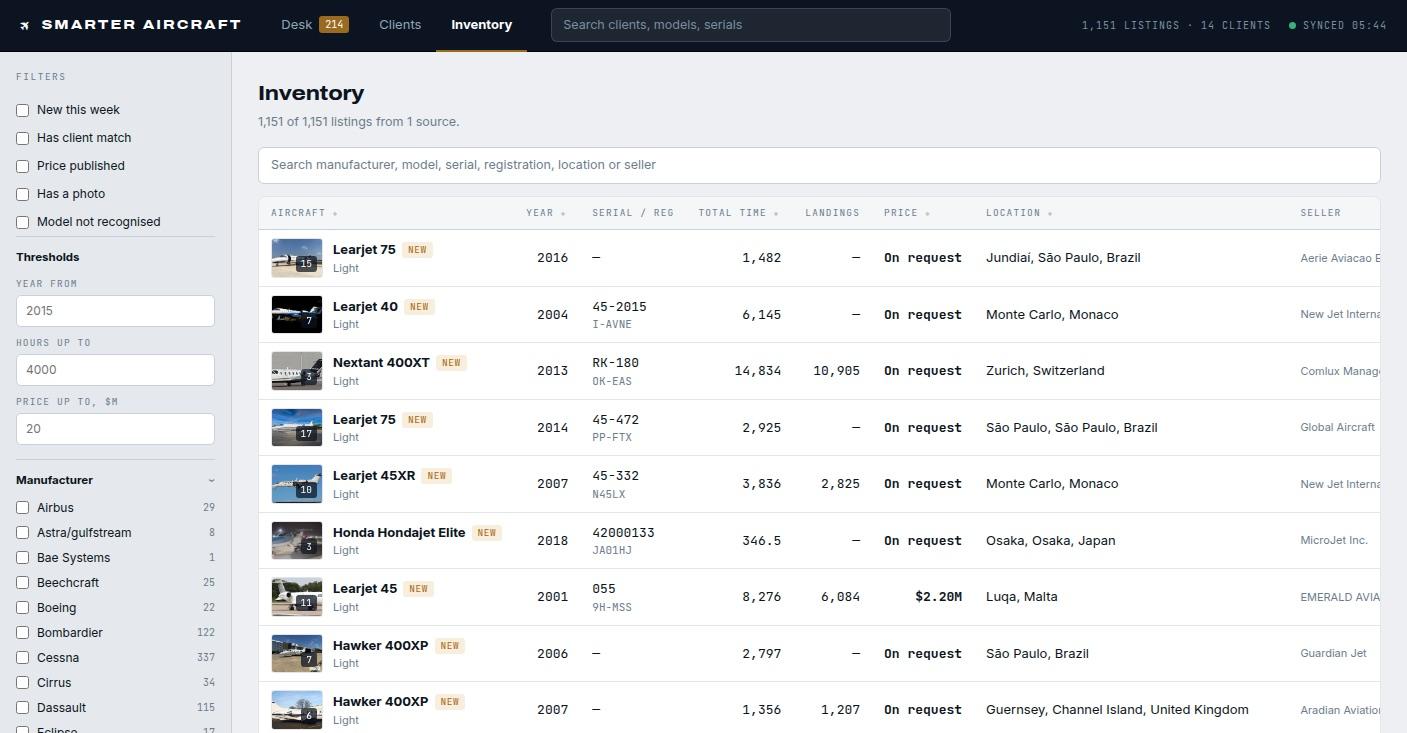
Smarter Aircraft works for the buyer, so their value is knowing the market better than the people selling into it. At any moment there are hundreds of jets for sale, and the team needs to know what each one is, what the seller wants for it, how many hours it has flown and what kind of condition it’s in. All of that lived in spreadsheets, split up by aircraft type. Answering a basic question, like which jets of a certain type are inside a budget and haven’t flown too much, meant opening several files and reading them by eye. Because the answers took that much digging out, the team ended up asking whoever had looked most recently rather than checking for themselves. That’s now one system holding 1,151 aircraft, with filters for the things they search on.
Merging duplicate listings of the same jet
A jet for sale is usually advertised in several places at once. The seller puts it on their own website, it goes up on a couple of industry marketplaces, and it appears again in the paid databases brokers subscribe to. The same aircraft turns up several times over, described differently in each, and often still listed as available somewhere after it has sold. The platform reads all of those sources on a schedule and merges what it finds, so a jet advertised in four places becomes a single entry. When a price drops or an aircraft goes under contract, it shows up as a change against that aircraft instead of waiting to be noticed on someone’s next pass through the sites.
Keeping their own notes out of what the buyer sees
Smarter Aircraft keeps its own notes on every jet as well as the public details, covering what they think it’s really worth and what they’ve picked up from talking to the seller. None of that can reach the buyer. Sending a buyer a shortlist used to mean copying the spreadsheet and deleting those columns by hand, which only has to be forgotten once to be a problem. Every piece of information is now marked private or shareable when it’s first recorded, and the spreadsheets, PDFs and emails that go out to buyers are built from that marking automatically.
The spec sheet pipeline
When a jet is for sale, the seller’s broker publishes a spec sheet. It’s a long PDF with the full specification, the maintenance status and photos of the aircraft. Smarter Aircraft has to pass it to the buyer, but not as it arrives. The seller’s branding is on every page, the aircraft’s registration is on every photo, and there are tracking links and metadata inside the file that never appear on screen. A buyer who spots any of it can go direct and cut the brokerage out of its own deal.
They had already tried this with off-the-shelf AI tools. The output looked fine at a glance, but the model rebuilt each page as a flat image rather than editing it, so the text stopped being text. Given the same instructions twice, it produced two different documents.
What it needed was structure around the model rather than a better prompt. We split the job into steps and gave each one a defined scope. The model decides what has to come off, the code takes it off so the file is edited instead of rebuilt, and someone approves every edited photo before it goes anywhere. The specification survives untouched, and what comes out is still a working PDF.


Ingest
The broker’s PDF, exactly as they sent it.
Classify
A model reads every element on every page and identifies what it is.
Remove
Seller identity, registration and serial numbers, location, branding, links and metadata. Ten categories, each its own step, because one pass over a page misses things.
Reconstruct
The photo repaired wherever a watermark or a tail number has been taken out of it.
Review
Before and after on every edited image. Rejecting one keeps the original, so a person makes the final call.
Export
The same document, same layout, specification intact. Thirty seconds start to finish.
Related case studies
Eagle Medical Billing
We helped Eagle Medical Billing replace manual claim entry with a system that parses their billing PDFs locally.
In-home therapyIntegrated Clinix
We helped Integrated Clinix answer every billing call with an AI voice agent that takes the details and screens out spam.
Aerospace machine shopJTR Specialties
We helped JTR Specialties win larger contracts with a rebrand, a website documenting their capabilities, and a custom job-costing app.